STARK / The app
A free workout app with no subscription, for iPhone and Apple Watch
We make STARK, so we say it upfront. This page does two things: show you what you can do for free, and give you the criteria to compare other apps without getting caught out.
Updated October 30, 2026 · Written by the STARK team.
Searching for a free workout app with no subscription often lands you on a page that promises a lot and asks for €9.99 three screens later.
STARK is a strength training tracker for iPhone and Apple Watch. You log your sets, see your last weights and follow your progress. Without paying, and without ads.
Short answer:
- 1,394 exercises with video and form cues.
- 30+ ready-to-follow programs, including bodyweight ones.
- Set logging, rest timer, volume, records, estimated 1RM.
- Set logging and rest times on Apple Watch, Apple Health sync.
- Paid version at €2.99 a month or €29.99 a year, with a 7-day trial. No essential feature is locked.
What you can do for free with STARK
The exercise library: 1,394 movements, with video and technique cues. Filter by muscle or equipment and find the movement that matches the machine available at your gym.
Programs: 30+ ready-made programs: full body, upper/lower, push/pull/legs, bodyweight. Choose by the number of sessions your week can really take, not the one you wish it could.
Set logging: you note reps and weight. Your last weights show up when you need them, without digging through your history. It is the core of the app: logging your performance set after set.
Rest time: a timer started straight from your session, also on the watch. You never leave your screen to look for a stopwatch.
Progress: volume, records, estimated 1RM, history per exercise, body weight over time. You see what is going up, what is stalling and what you have not touched in three weeks.
Recovery: a weekly muscle review, muscle by muscle, with recovery estimates. Guidelines, not orders: check them against how you feel.
Apple Watch and Apple Health: log a set from your wrist and follow your rest time without taking out your phone. Your workouts and steps go to Apple Health.
The activity feed: see your friends’ finished sessions and cheer them on. It will not make you progress for you; it just helps you come back.
Zero ads: no banner, no video, no “watch an ad to continue”. A workout app that interrupts you mid-set has understood nothing about your session.
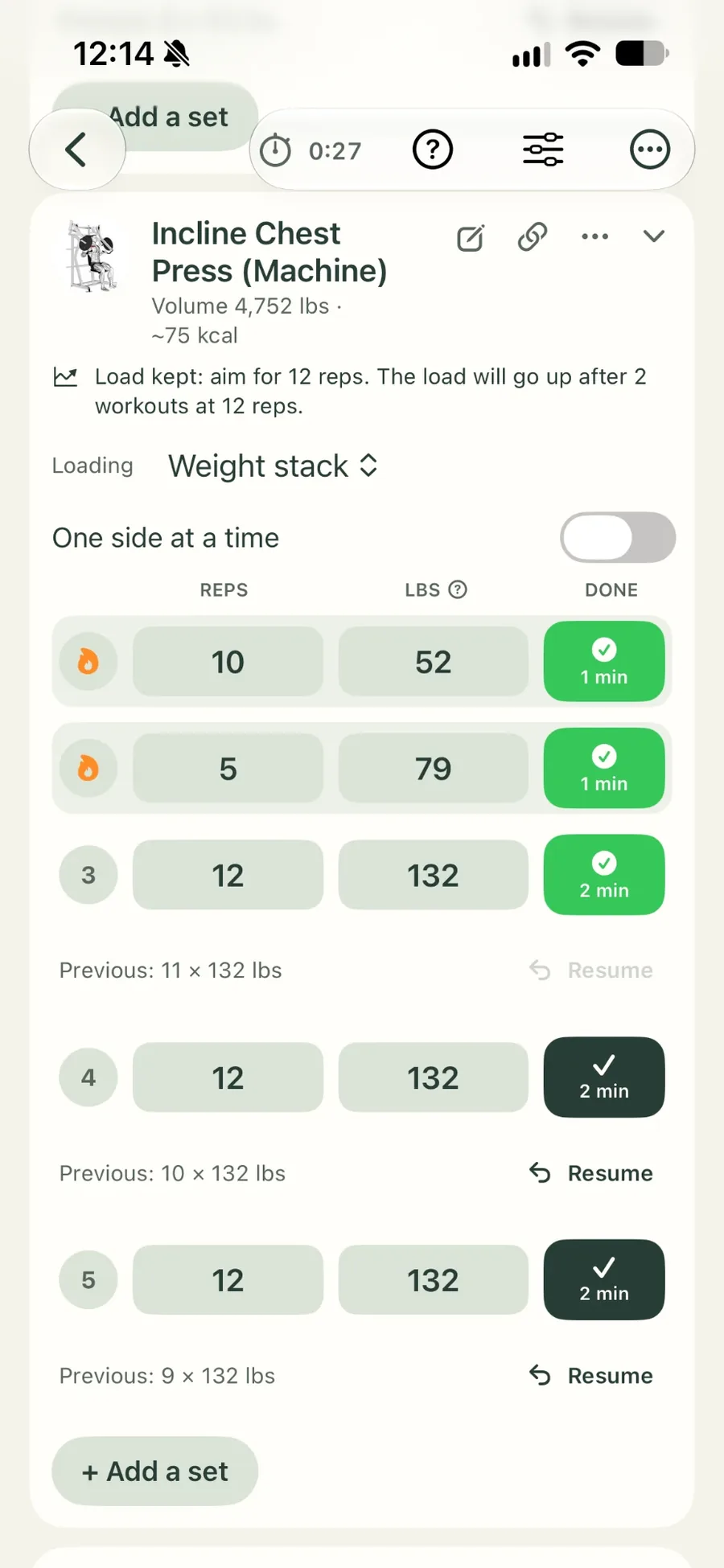
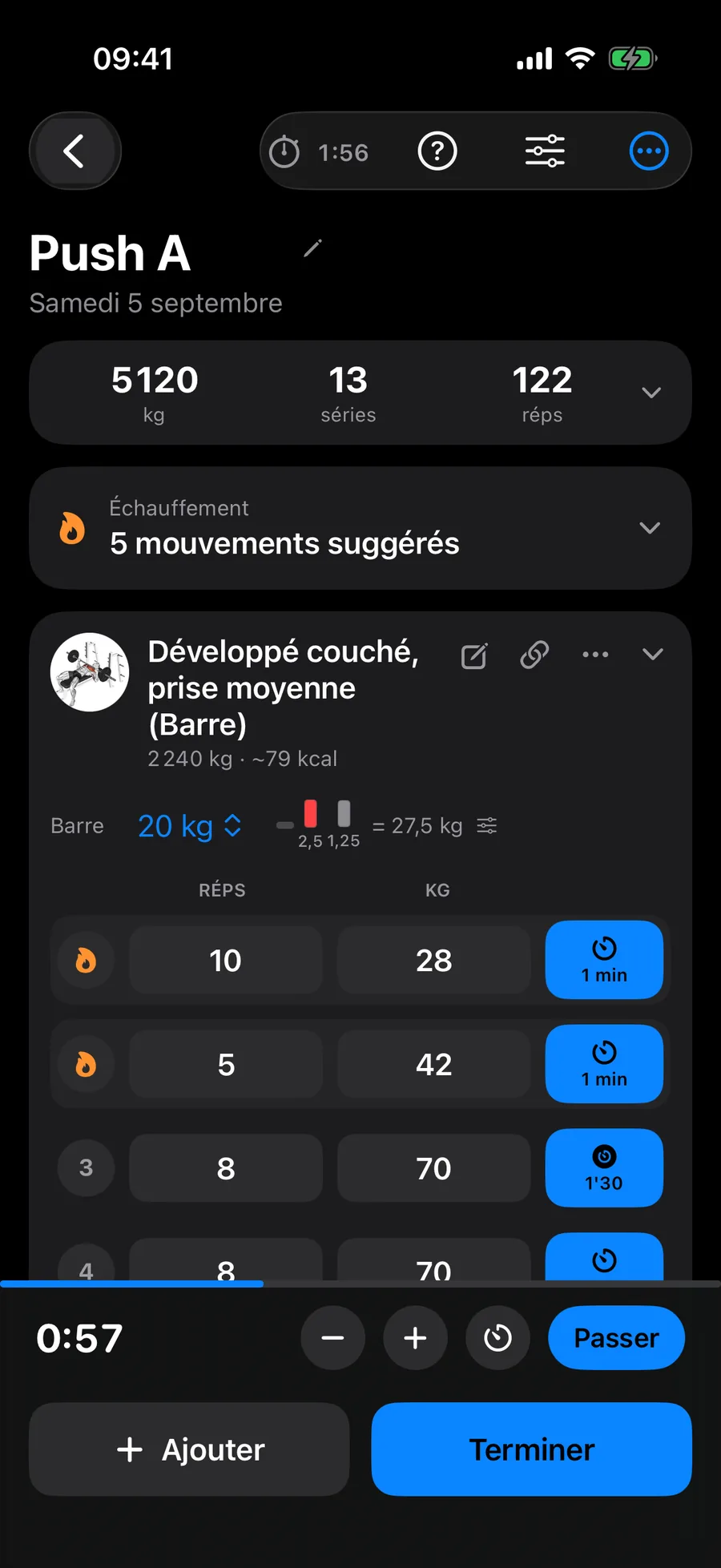
What it means in practice: you can go for months on the free version without hitting a wall. The app does not greet you with a short trial and then a payment screen.
What the paid version adds
The price: €2.99 a month, or €29.99 a year (about €2.50 a month). Same content either way, and no €14.99 tier on the side to make the other one look like a bargain.
The trial: 7 days to make up your mind.
What it pays for: developing the app, not advertising. STARK is a small team; the subscription pays for work on the app, not for banners bought elsewhere.
What it adds: more programs and long-period statistics. What is free today stays usable without paying.
What it does not do: it does not cut your history, it does not block your sessions, and it does not send you a guilt-tripping notification at 10 pm.
What we refuse: the 24-hour countdown, the crossed-out price, the tiny “no thanks” button, the cancellation form you cannot find. Through the App Store, you cancel in Settings, your name, Subscriptions: three screens, not a call to customer service.
The simple rule: if the free version is enough, stay free. We prefer that to a subscription cancelled after two weeks, which leaves a bad memory and a one-star review.
Prices observed on the French App Store on October 30, 2026. They can vary by country and change over time: the App Store listing is the reference.
Free does not have to mean limited: what to check before choosing an app
The real issue is not the price, it is the ceiling. A free app can be generous, or block you at your third routine while offering you a “lifetime deal” at 70% off.
| Criterion | The question to ask | At STARK |
|---|---|---|
| Free version limits | How many workouts, routines and how much history before the wall? | Unlimited workouts, full history |
| Ads | Banners or a video between two sets? | None |
| Watch support | A real watchOS app, or just a sync after the session? | Apple Watch app: set logging and rest timer |
| Building programs | Fixed templates or real freedom of structure? | 30+ programs, plus your own routine with your exercises and machines |
| Price and exit | How much, and how do you cancel? | €2.99/mo or €29.99/yr, cancel through the App Store |
1. The limits of the free version. Count the workouts saved, the number of routines you can keep and how far back your history goes. Hevy’s free plan caps saved routines at 4 (hevy.com/pricing) and keeps 3 months of history; Strong’s caps them at 3, according to the comparison published by Hevy (Hevy vs Strong). They are good apps, but the ceiling comes quickly when you follow three different programs in a year. Details in our comparison of workout apps.
2. Ads. A free app funded by ads charges you another way: in attention, and sometimes in data. Look at what shows up between two sets before you look at the price.
3. Watch support. Not every iPhone app offers a real watchOS app. Some only write the session to Health once it is over, which does not help during the effort. A watch app should start a workout session and write to HealthKit with your permission: that is the technical framework set by Apple (HealthKit documentation).
4. Building programs. An app for creating your own workout program is not judged by its number of templates, but by what you can change: exercises, sets, reps, order, available equipment. A generator that imposes its structure is not a creation tool.
5. Price and exit. In France, since September 1, 2023, a business that lets you subscribe online must also offer free, easily accessible online cancellation (service-public.gouv.fr). If you cannot find the button, it is not a design oversight.
STARK or a paper notebook?
A real question, an honest answer: paper sometimes wins. A notebook costs a few euros, never runs out of battery and never sends you a notification.
Paper wins when: you train in a gym where your phone stays in the locker, you do four exercises and three sets, you like writing between sets, and you have no wish to look at charts.
The app wins when: you want your last weight without thinking, to see whether your volume rises over eight weeks, to start a rest without counting in your head, or to log a set from your watch.
The notebook’s weak point: it records very well, it does not calculate. You know what you lifted on March 12. You do not know whether your bench press went up 4 kg in two months. That is exactly the job of a workout log app: keep the record, and make it readable.
The app’s weak point: the phone. A notebook does not send you a message in the middle of a set.
The verdict: if your notebook works, keep it. The best tool is the one you fill in. If you change notebooks every three months, the app solves your problem. More in our guide to keeping a workout log.
A workout app on Apple Watch: why it changes the session
The real problem: unlocking a phone between two sets. A few seconds per set, times twenty sets, and your session happens as much on the screen as under the bar.
What the wrist changes: you log your set from the watch, see the current set and follow your rest time. The phone stays in the bag and the session stays a session.
Apple Health both ways: STARK reads from and writes to Health. Your workouts and steps come through, and your activity stays in the same place as the rest of your health data.
On the watch, be demanding. Three things to check before choosing an Apple Watch workout app: set logging (not just a timer), a rest timer you can reach without going back to the iPhone, and data actually written to Health. Without all three, you have a remote control, not a tool.
And the competition? Hevy and Strong also offer a watch app. They do the job, and if you are already on one with a history, switching is not necessarily worth it.
And Android? STARK is iPhone only. If you are on Android, look elsewhere without wasting time: Epilog or Hevy are good choices on Android.
How to start in 3 steps
1. Install the app. STARK is on the App Store for iPhone, with the Apple Watch app included. Download STARK.
2. Choose a starting point. One of the programs, or your own routine if you already have one. A benchmark: the WHO recommends at least two muscle-strengthening sessions a week for adults (who.int). That is a floor, not a goal.
3. Log your first set. Reps, weight, rest. That is all. Next session, your weights will already be there.
The week after: open the same exercise, look at the last weight, add a rep or a little weight. That is progress. The rest is decoration.
Start free at your next session
No ads, no mandatory subscription, unlimited workouts and your full history, on iPhone and Apple Watch.
Frequently asked questions
Is there really a free workout app for the gym?
Yes. STARK is free at the gym: its 1,394 exercises include machine and barbell movements, and load tracking works from your first session. You do not pay for access; if you want, you pay for the extras.
Can I do bodyweight training with STARK for free?
Yes. Some of the programs are built with no equipment. You log your reps without load, follow your progress by rep count, and add your own exercises if a movement is missing. Same tracking, no subscription.
How do you log your lifts without breaking up your session?
Three gestures: your last weight is shown, you confirm the set, the rest timer starts. On Apple Watch you do the same without taking out your phone. It is short on purpose: an app that takes twenty seconds per set ends up abandoned.
Can I create my own workout program in STARK?
Yes. You can follow your own routine and add your own exercises and machines to your tracking.
Does STARK work on Apple Watch?
Yes. You log your sets from the watch, follow your rest time, and your data goes to Apple Health. The iPhone is still useful for the exercise library and reviews, but you no longer need it between sets.
Sources
- WHO: physical activity fact sheet
- Apple Developer: Running workout sessions (HealthKit)
- service-public.gouv.fr: online cancellation of contracts (in French)
- Hevy: pricing and free plan limits
Update note, October 30, 2026: features and prices checked on this date. App Store prices can vary by country and change over time; the App Store listing is the reference.